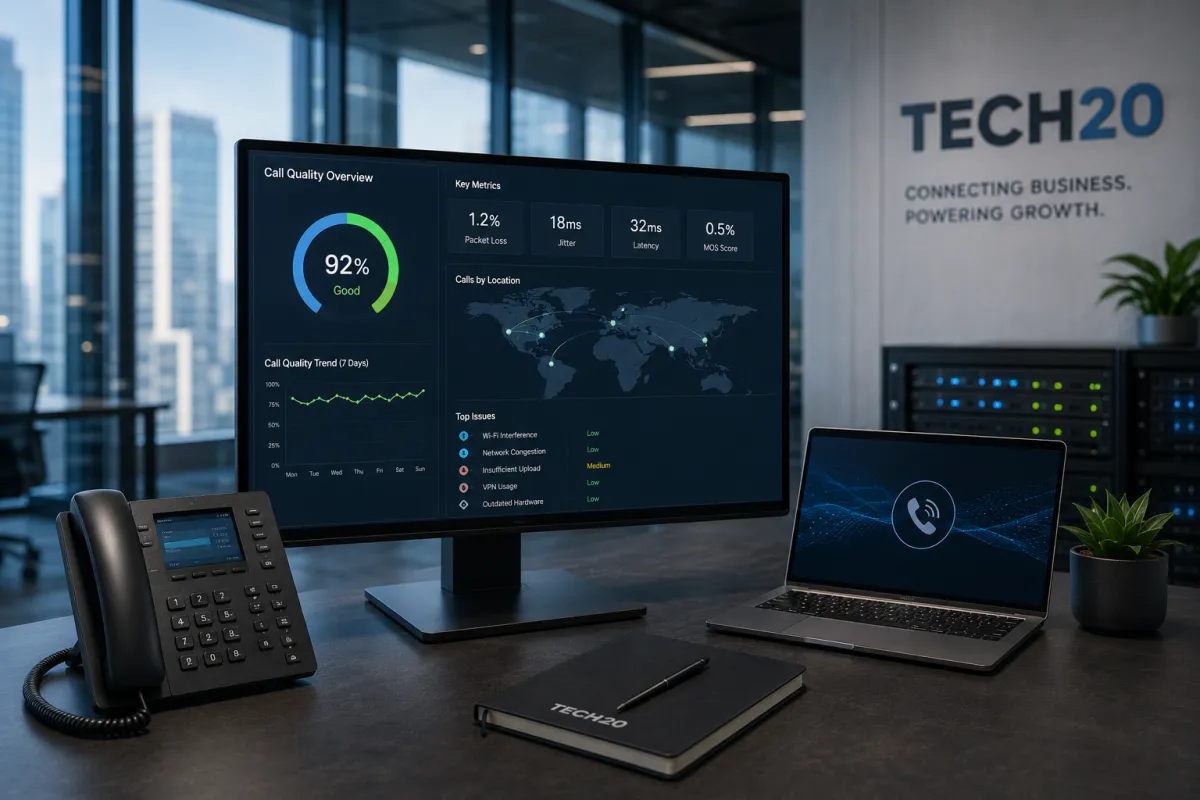
Why Do My Business VoIP Calls Sound Choppy or Keep Dropping?
Business VoIP calls usually sound choppy or drop because voice traffic is being delayed, lost, or forced to compete with other network activity.
Common causes include unstable internet, limited upload capacity, Wi-Fi interference, network congestion, outdated hardware, poor Quality of Service configuration, and remote employees using unreliable connections.
Tech20 designs cloud phone systems and business connectivity as one connected environment, including VoIP deployment, call-flow optimization, internet-provider selection, redundancy, and Quality of Service tuning for voice and video.
Quick Answer
Your business calls may sound robotic, delayed, or broken up because of:
Packet loss
High jitter
Network latency
Insufficient upload bandwidth
Congested office internet
Weak or overloaded Wi-Fi
Incorrect firewall settings
Outdated routers or switches
Calls traveling through a VPN
Missing Quality of Service rules
An unstable home internet connection
Problems with the VoIP provider or handset
The best solution is to identify where the call quality begins to degrade instead of immediately replacing the entire phone system.
How Does a VoIP Phone Call Work?
VoIP converts a conversation into small packets of digital information and sends them across an IP network.
A cloud phone call may travel through:
The employee’s handset, computer, or mobile application
The office Wi-Fi or wired network
The network switch
The firewall or router
The business internet connection
The cloud phone provider
The receiving caller’s network and device
A weakness anywhere along that path can affect the conversation.
Tech20’s Business Voice service connects users, devices, routing tools, voicemail, call handling, and management through a secure cloud platform. It supports calling from desk phones, desktop applications, mobile devices, and browsers.
What Does Choppy VoIP Audio Sound Like?
Employees or customers may describe poor call quality as:
Robotic voices
Missing words or syllables
Delayed responses
One-way audio
Echoing
Crackling
Calls cutting in and out
Calls disconnecting entirely
People speaking over each other
Long pauses before audio arrives
These symptoms often provide clues about the underlying network problem.
For example, Microsoft explains that jitter can create robotic audio, packet loss can cause missing words, and excessive round-trip delay can create a walkie-talkie effect in which participants talk over each other.
What Is Packet Loss?
Packet loss occurs when some of the data carrying the conversation fails to reach its destination.
A small number of isolated missing packets may not be noticeable. Repeated or consecutive losses can cause:
Missing syllables
Broken sentences
Audio cutting out
Distorted voices
Disconnected calls
Microsoft describes packet loss as one of the major measurements used to evaluate real-time voice and video quality.
Packet loss may result from:
Internet congestion
Weak Wi-Fi
Faulty cabling
Overloaded network equipment
Provider issues
Poor firewall configuration
Limited bandwidth
Hardware failure
What Is Jitter?
Jitter is the variation in how quickly voice packets arrive.
The packets should arrive in a steady sequence. When some arrive late and others arrive early, the phone system must attempt to reorganize them before playing the audio.
Excessive jitter may cause voices to sound:
Robotic
Uneven
Distorted
Choppy
Temporarily silent
Cisco explains that jitter can result from congestion, improper queuing, or configuration problems. When the variation becomes too large for the receiving system’s buffer, audio dropouts may be heard.
What Is Network Latency?
Latency is the time required for voice data to travel between the participants.
Some delay is unavoidable. Excessive delay creates noticeable pauses in the conversation.
High latency may cause:
Participants to interrupt each other
Slow responses
Awkward pauses
Calls that feel disconnected
A walkie-talkie-style conversation
Latency may increase because of:
Long network routes
Overloaded equipment
Provider congestion
VPN usage
Poor Wi-Fi
Satellite or cellular connections
Traffic traveling through distant servers
How Does Internet Speed Affect VoIP?
VoIP calls do not normally require enormous amounts of bandwidth, but they do require consistent and timely delivery.
A business may have a high advertised download speed and still experience bad calls because of:
Low upload speed
Inconsistent performance
Packet loss
High jitter
Network congestion
Poor Wi-Fi
Inadequate internal equipment
The upload connection is particularly important because the business must continuously send audio to the other caller.
Tech20’s Dedicated Business Internet service is designed for cloud tools and latency-sensitive workloads and includes circuit planning, redundancy, failover, and Quality of Service tuning for voice and video.
Why Do Calls Become Worse During Busy Hours?
The office connection may perform well early in the morning and deteriorate when employees begin:
Joining video meetings
Uploading large files
Running cloud backups
Streaming
Synchronizing cloud folders
Downloading software
Using guest Wi-Fi
Making many calls simultaneously
When network capacity becomes congested, time-sensitive voice packets may compete with less urgent traffic.
A file download can tolerate a brief delay. A live conversation cannot.
This is why simply testing the internet at a quiet time may not reveal the actual problem.
What Is Quality of Service?
Quality of Service, or QoS, allows network equipment to prioritize voice and video traffic over less time-sensitive activity.
For example, the network may prioritize an active phone call over:
A software update
A large download
Cloud synchronization
Guest Wi-Fi traffic
Streaming
A background backup
Microsoft recommends using QoS to prioritize real-time traffic because voice and video are especially sensitive to delay. It notes that consistent QoS settings may be needed across devices, switches, routers, and the wider managed network path.
QoS is not a substitute for an inadequate internet connection, but it can help a business use available bandwidth more effectively.
Why Does Wi-Fi Cause VoIP Problems?
Wi-Fi introduces additional variables that do not exist with a properly installed wired connection.
Call quality may be affected by:
Weak signal strength
Thick walls
Distance from the access point
Too many connected devices
Radio interference
Outdated access points
Poor access-point placement
Employees moving around the office
Devices switching between access points
A wired desk phone may work perfectly while a laptop-based softphone experiences choppy audio in another part of the office.
When practical, test the same call using a wired connection. If the problem disappears, Wi-Fi is likely contributing to the issue.
Can the Business Router or Firewall Cause Choppy Calls?
Yes.
Routers, switches, and firewalls may affect VoIP quality when they are:
Outdated
Overloaded
Incorrectly configured
Missing QoS support
Inspecting voice traffic too aggressively
Blocking required traffic
Unable to handle current bandwidth
Running unsupported firmware
A business may upgrade to a faster internet circuit while continuing to use equipment that cannot process the new speed efficiently.
The network should be reviewed from the device to the carrier, not only at the internet-provider handoff.
Can a VPN Affect VoIP Calls?
A VPN may add additional routing, encryption overhead, and delay.
Microsoft recommends avoiding real-time communications over a VPN when possible because the VPN can introduce packet overhead and delay.
This may affect remote employees whose phone or meeting traffic is forced through the company’s central office before reaching the cloud platform.
A business should review whether voice traffic needs to travel through the VPN or can use a secure direct connection to the approved cloud phone service.
Why Do Remote Employees Have More Call Problems?
Remote employees use internet connections and Wi-Fi environments that the business may not directly control.
Potential problems include:
Consumer-grade routers
Weak home Wi-Fi
Shared household bandwidth
Cellular connections
VPN delays
Old laptops
Bluetooth headset problems
Background streaming
Limited upload speed
The company should determine whether the issue affects:
One employee
One location
One internet provider
One device model
All employees
Only remote users
Only incoming or outgoing calls
This helps isolate whether the cause is local, company-wide, or provider-related.
Can the Phone or Headset Be the Problem?
Yes.
Call quality issues may come from the endpoint rather than the internet connection.
Possible causes include:
Damaged headsets
Loose cables
Low-quality microphones
Bluetooth interference
Outdated phone firmware
Incorrect audio settings
Failing desk phones
Computer resource limitations
The wrong input or output device
Test the call using another device or headset before assuming that the entire network is failing.
What Causes One-Way Audio?
One-way audio means one participant can hear the other, but the conversation does not work in both directions.
Possible causes include:
Firewall rules
Network address translation problems
Blocked ports
VPN configuration
Session Border Controller issues
Provider routing problems
Incorrect handset configuration
This issue usually requires a review of the network path and phone-system configuration rather than additional bandwidth alone.
Why Do Calls Drop Completely?
Dropped calls may be caused by:
Brief internet outages
Wi-Fi disconnections
Packet loss
Firewall session timeouts
Provider interruptions
Device switching between networks
VPN instability
Failed automatic failover
Power interruptions
Faulty network equipment
Microsoft’s call-quality monitoring guidance links dropped or disconnected calls with measurements such as packet loss, jitter, round-trip time, and audio-healing activity.
Does the Business Need More Bandwidth?
Possibly, but bandwidth should not be the first assumption.
The company may need additional bandwidth when:
Many calls occur simultaneously
Employees also use frequent video meetings
Large uploads happen throughout the day
Cloud backups run during business hours
The office has grown
The current connection has limited upload capacity
The connection is consistently congested
However, increasing speed may not fix:
Weak Wi-Fi
Faulty cables
Packet loss
High latency
Misconfigured QoS
Outdated hardware
Provider routing issues
The actual bottleneck should be identified before purchasing a more expensive plan.
Does VoIP Require Dedicated Internet?
Not every business requires Dedicated Internet Access.
Shared business broadband may be sufficient when:
The office has few users
Call volume is limited
Upload capacity is adequate
Performance remains stable
A backup connection is available
Dedicated internet may be appropriate when:
Calls are business-critical
The company operates a contact center
Performance varies throughout the day
The organization has many simultaneous users
Stronger service commitments are required
The business depends heavily on cloud systems
Downtime directly affects revenue
Tech20 positions dedicated connectivity for always-on operations and latency-sensitive workloads, with symmetrical options, provider selection, failover planning, and voice and video prioritization.
Should the Business Have Backup Internet?
A backup connection can preserve phone service when the primary internet circuit fails.
The secondary connection may use:
A different fiber or cable provider
Fixed wireless
Cellular 5G or LTE
Another building entry path
The network should automatically move critical traffic to the backup connection.
The business should test whether:
Calls still connect
Call quality remains usable
Active calls survive the switch
Remote applications remain available
Employees know what happens during an outage
Tech20’s connectivity planning includes redundancy and automatic failover strategies.
How Can a Business Troubleshoot Choppy VoIP Calls?
1. Identify Who Is Affected
Determine whether the problem affects one user, one department, one office, remote employees, or the entire business.
2. Record When It Happens
Document:
Time of day
Call direction
Device used
Wired or wireless connection
Internet provider
Other network activity
Whether video meetings were also running
3. Test a Wired Connection
Move the affected user from Wi-Fi to Ethernet when possible.
4. Test Another Device
Use a different handset, headset, laptop, or mobile application.
5. Review Internet Performance
Check upload and download capacity, latency, jitter, packet loss, and consistency during actual business hours.
6. Review Call Analytics
Modern phone platforms may provide information about call quality, failed calls, wait times, trends, devices, and users.
Tech20’s Business Voice service includes call analytics and real-time insights.
7. Review QoS
Confirm that voice traffic is being identified and prioritized throughout the managed network.
8. Inspect Network Hardware
Review the router, firewall, switches, access points, cabling, and firmware.
9. Contact the Internet and VoIP Providers
Determine whether the issue is occurring inside the office, on the carrier connection, or within the phone platform.
Common VoIP Troubleshooting Mistakes
Replacing the Phone System Immediately
The phone platform may not be the cause. The issue may be the office network or internet connection.
Upgrading Internet Without Testing
More speed does not automatically correct jitter, packet loss, or bad Wi-Fi.
Testing Only One Call
Intermittent problems require several tests across users, devices, and times of day.
Ignoring Remote Employees
Home networks and VPN configurations may create problems that do not affect office users.
Using Wi-Fi for Every Device
Critical desk phones and call-center workstations may perform better on wired connections.
Failing to Monitor Call Quality
Call-quality reports can reveal patterns that users may describe only vaguely.
Frequently Asked Questions
Why does my VoIP call sound robotic?
Robotic audio is commonly associated with excessive jitter, packet loss, or an unstable connection.
Why can I hear the caller, but they cannot hear me?
One-way audio may be caused by blocked network traffic, firewall rules, NAT problems, VPN configuration, or provider routing.
Can slow upload speed affect VoIP?
Yes. The business must continuously upload voice data during a conversation.
Does Wi-Fi work well for business VoIP?
It can, but performance depends on signal strength, access-point capacity, interference, and network design. Wired connections are often more predictable for critical workstations.
Will faster internet stop dropped calls?
Only when insufficient bandwidth or congestion is the cause. It will not automatically fix faulty equipment, Wi-Fi interference, packet loss, or incorrect configuration.
What is the best way to test VoIP quality?
Review real calls using call analytics and measure latency, jitter, packet loss, network congestion, and device performance.
Can Tech20 review both the phone system and internet connection?
Yes. Tech20’s approach combines Business Voice, Dedicated Business Internet, network planning, redundancy, and QoS tuning within one technology strategy.
Fix the Network Problem Behind the Bad Call
Choppy audio is usually a symptom, not a complete diagnosis.
The cause may involve internet performance, Wi-Fi, network congestion, hardware, firewall configuration, QoS, remote access, or the phone platform itself.
Tech20 helps businesses evaluate cloud phone systems, business internet, call quality, network equipment, routing, redundancy, and ongoing performance as one connected environment.

