How Can AI-Powered Call Routing Help a Business Stop Missing Leads?
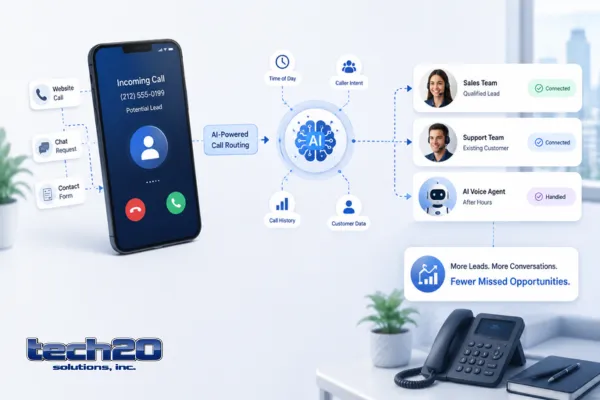
AI-powered call routing helps businesses answer more calls, identify what each caller needs, and connect them with the right person or workflow faster. It can also support after-hours responses, automated qualification, callback scheduling, call summaries, and CRM updates.
For New York businesses that depend on incoming calls for sales, appointments, or customer support, smarter routing can reduce missed opportunities without requiring every call to be handled manually.
Quick Answer
AI-powered call routing can help a business reduce missed leads by:
Answering calls immediately
Understanding why the customer is calling
Routing calls by intent, department, location, or urgency
Collecting information when employees are unavailable
Offering callbacks or appointment scheduling
Sending missed-call follow-ups
Recording outcomes in the CRM
Escalating valuable or sensitive calls to a person
The goal is not to remove human service. It is to make sure callers reach the right person faster and fewer opportunities disappear into voicemail.
What Is AI-Powered Call Routing?
Traditional call routing follows fixed instructions.
For example:
Press 1 for sales
Press 2 for support
Press 3 for billing
AI-powered routing can use the caller’s words, account information, call history, business hours, or other approved data to determine where the conversation should go.
A caller may say:
“I need pricing for internet service at our second office.”
The system may recognize that the caller is:
Asking about business internet
Interested in a new location
Likely a sales opportunity
Requesting pricing
It can then route the call to the correct team, create a lead record, or offer to schedule a consultation.
Tech20’s Business Voice capabilities include intelligent routing, virtual agents, advanced call queues, callbacks, analytics, CRM integration, AI transcription, and conversation intelligence.
Why Missed Calls Matter
A missed call is not always just an unanswered phone.
It may represent:
A prospective customer requesting a quote
An existing customer needing urgent support
A caller trying to schedule an appointment
A vendor waiting for approval
A high-value opportunity calling after hours
When callers encounter long hold times, confusing menus, or unanswered phones, they may contact another provider instead.
AI-supported communication workflows can help the business respond immediately, even when the correct employee is busy or unavailable.
Tech20 positions its AI services around responding to leads quickly, reducing manual workflow bottlenecks, and integrating automation with existing communication systems rather than replacing the entire technology environment.
How Does AI Call Routing Work?
A typical workflow may look like this:
A customer calls the business.
The phone platform answers immediately.
The caller explains what they need.
The system identifies the likely intent.
The call is routed to the appropriate employee, department, queue, or location.
If nobody is available, the caller receives another useful option.
The interaction is recorded in the appropriate business system.
The employee receives the caller’s information and conversation context.
The exact workflow depends on the phone platform, integrations, business rules, and level of automation.
What Happens When No One Is Available?
A strong system should do more than send every unanswered caller to voicemail.
Depending on the business, it may:
Offer an estimated callback
Schedule an appointment
Collect the caller’s name and reason for calling
Send a confirmation message
Route the call to another location
Notify an available employee
Create a CRM task
Send an approved missed-call text
Transfer urgent calls to an escalation contact
This helps the business continue the customer journey instead of ending it when an employee cannot answer.
Can AI Help Qualify Leads?
Yes, when the qualification process is clearly defined.
An AI-supported call workflow may collect information such as:
Company name
Number of employees
Number of business locations
Service being requested
Current provider
Estimated timeline
Main business problem
Preferred meeting time
The system can then route the lead according to the company’s rules.
For example:
A business requesting a new phone system goes to the voice team.
A multi-location company requesting field support goes to nationwide IT support.
A company reporting a suspected security incident is escalated immediately.
A small office asking about connectivity receives the appropriate internet workflow.
Human employees should remain responsible for recommendations, pricing commitments, complex qualification, and sensitive decisions.
Can AI Routing Improve Customer Service?
AI routing can improve customer service when it reduces unnecessary transfers and gives employees better context before they answer.
Potential benefits include:
Shorter wait times
Fewer incorrect transfers
More consistent after-hours handling
Faster access to the right department
Better visibility into call reasons
Easier callback management
More complete customer records
The customer should still have a clear path to a person.
Automation becomes frustrating when callers are trapped in repetitive questions or cannot reach human support.
How Can Call Analytics Help?
Call analytics can help leadership understand what is happening across the phone system.
Useful measurements may include:
Total call volume
Missed calls
Answer rates
Average wait time
Abandoned calls
Peak calling periods
Call reasons
Department performance
Callback completion
Lead-to-appointment conversion
Tech20’s Business Voice service includes call analytics and real-time insights designed to help organizations review call activity and improve routing and performance.
These reports can help answer questions such as:
Are calls being missed during lunch?
Which department receives the most inquiries?
Do callers abandon the queue after a certain wait time?
Are after-hours leads receiving follow-up?
Are calls being transferred repeatedly?
How Can AI Call Summaries Help Employees?
AI transcription and summarization can reduce the amount of manual note-taking required after a call.
A summary may capture:
The caller’s main request
Important questions
Agreed next steps
Follow-up tasks
Products or services discussed
Appointment details
This can help employees prepare for follow-up and maintain more complete customer records.
Call recording and transcription should be configured according to applicable laws, consent requirements, company policies, and industry obligations.
Can the Phone System Connect With a CRM?
Many modern cloud phone systems can connect with CRM and business applications.
An integration may:
Display customer information when a call arrives
Create new contact records
Record call activity
Assign follow-up tasks
Save approved summaries
Update opportunity stages
Notify sales representatives
Trigger automated follow-up
Tech20 states that its voice services support CRM and business application integrations, including context, customer history, and workflow automation.
The value of the integration depends on data quality. Duplicate, outdated, or incomplete CRM records can reduce routing accuracy.
Does AI-Powered Calling Require a New Phone System?
Not always.
Some businesses can add AI-supported features to an existing cloud phone environment. Others may need to replace a legacy phone system that does not support integrations, analytics, remote users, or intelligent routing.
Before replacing anything, review:
Current phone platform
Existing numbers
Call flows
CRM compatibility
Internet reliability
Remote-work requirements
Security controls
Contract terms
Current reporting capabilities
Tech20 states that its AI solutions can integrate with existing voice systems, CRMs, workflows, and customer channels without automatically requiring a complete replacement.
Why Internet Reliability Matters
Cloud phone systems depend on stable connectivity.
Poor internet performance may cause:
Choppy audio
Dropped calls
Delayed conversations
Failed transfers
Disconnected applications
Inconsistent routing
The business should review:
Upload capacity
Latency
Packet loss
Jitter
Firewall configuration
Backup connectivity
Quality-of-service settings
Tech20’s connectivity services include circuit design, provider selection, redundancy, failover, and quality-of-service planning for voice and video.
Learn more about Tech20 Dedicated Business Internet.
What Should Remain Human?
AI can handle repetitive call tasks, but some conversations require judgment, empathy, and authority.
A person should handle:
Complex sales consultations
Sensitive customer complaints
Legal or contractual commitments
Security incidents
Medical or regulated matters
Large financial decisions
Unusual technical problems
High-value negotiations
The system should recognize when escalation is required and make the transfer easy.
Common Call Automation Mistakes
Automating a Poor Call Process
If the existing call flow is confusing, adding AI may make the confusion faster rather than fixing it.
Asking Too Many Questions
Callers should not complete a long interview before reaching the appropriate employee.
Removing the Human Option
Customers should be able to reach a person when automation cannot resolve the request.
Ignoring After-Hours Calls
A business may improve daytime routing while continuing to lose evening and weekend opportunities.
Failing to Connect the CRM
Without a useful handoff, employees may still need to re-enter information manually.
Using Unreliable Internet
Advanced routing cannot deliver a good customer experience over an unstable connection.
Collecting More Data Than Necessary
The workflow should request only the information needed to route or serve the caller.
How Should a Business Start?
Begin with one measurable problem.
Examples include:
Too many missed sales calls
Long wait times
Leads going to the wrong department
No after-hours response
Slow callbacks
Incomplete CRM records
Repetitive receptionist work
Then document:
Who calls the business?
Why do they call?
Which calls are most valuable?
Where should each type of call go?
What should happen when no one answers?
Which calls require immediate escalation?
What information should be saved?
How will success be measured?
A focused pilot is easier to test than rebuilding every call flow at once.
Frequently Asked Questions
Can AI answer business calls after hours?
Yes. Depending on the platform and configuration, it may answer common questions, collect information, schedule appointments, route urgent calls, or create a callback request.
Will callers know they are speaking with an automated system?
Businesses should communicate clearly and avoid misleading callers. The experience should also provide access to a person when appropriate.
Can AI route calls to different office locations?
Yes. Calls may be routed according to the caller’s request, location, business hours, department, employee availability, or other approved rules.
Can AI-powered routing work with remote employees?
Yes. Cloud phone systems can route calls to supported desk phones, desktop applications, mobile apps, and remote teams.
Can it send a text after a missed call?
Many modern communication platforms can support missed-call follow-up workflows, subject to platform features, consent, messaging rules, and configuration.
Can AI summarize customer calls?
Some platforms can transcribe and summarize calls. The business should review recording consent, privacy, access, retention, and accuracy requirements.
Is AI call routing only for large contact centers?
No. Small businesses can use it for appointment scheduling, sales routing, missed-call follow-up, and common customer questions.
Turn More Incoming Calls Into Real Opportunities
AI-powered call routing can help businesses answer faster, route callers more accurately, improve follow-up, and give employees better information before they begin a conversation.
The strongest approach combines intelligent routing with a reliable cloud phone platform, stable business internet, useful CRM integration, clear human escalation, and ongoing performance review.
Tech20 helps businesses design cloud phone systems with intelligent routing, call analytics, AI-ready integrations, and workflows built around sales and customer service.
Learn more about Tech20 Business Voice, explore Tech20 AI Solutions, or book a free business technology assessment.

